Set up a comment autopilot in three steps
Connect your accounts, flip a few switches, and let it run. Here is what each step does in CommentGate, what it asks you about, and how it earns the right to ask less.
Product 5 min read
On this page
Most comment tools hand you a blank rule builder and wish you luck. You end up writing "if the comment contains 'giveaway', hide it" at midnight, then discovering the next morning that it hid your own giveaway announcement.
CommentGate works the other way around. You connect your accounts, flip a few switches that each say one thing in plain words, and it runs. It asks you about the comments that really need a person, learns from every answer, and asks less as it earns your trust. This post walks through the three steps and what happens after.
Step 1: Connect
Connect the places your customers comment:
- Facebook Pages, and the Instagram professional accounts linked to them. Instagram connects through its Facebook Page; that is how Meta gives access to Instagram comments.
- TikTok business accounts.
- YouTube channels. The channel's owner connects it, or an owner or manager of its Brand Account.
- Threads profiles.
- Your Meta and TikTok ad accounts. This is the step people skip, and it matters most. Ads built in Ads Manager never appear on your Page, and they collect the worst comments. Connecting the ad account covers those dark posts, Instagram ad comments, TikTok Spark Ads and in-feed ads, and Threads ads through your Meta ad account, and it tells CommentGate which ad every comment came from.
When you connect, the last 30 days of comments come in, so you start with a real picture of your comment section instead of an empty list. There is no limit on how many accounts or brands you connect. See what each platform allows for the details per network.
Step 2: Flip the switches
Setup is a short list of switches. Each one is a sentence, and turning it on applies to the next comment that arrives.
On from the start:
- Hide scams and fake giveaways. Fake prize winners, "DM me to claim", fake support accounts and phishing.
- Hide spam. Unrelated promotion, follow-for-follow, adult spam and people plugging their own pages.
- Hide hate and harassment. Slurs, personal attacks on your customers or staff, and threats.
- Hide competitor mentions. People steering your customers to another brand.
Off until you want them:
- Hide profanity. Swearing and crude language.
- Hide links. Any comment with a link to another site. Links to your own site stay up.
- Hide phone numbers and emails. Keeps your customers from being contacted by strangers in your comments.
- Hide images and GIFs. Comments that are a picture, GIF or sticker.
- Hide negative comments. Criticism of your brand or products. Most brands leave these up and answer them, which is why it starts off.
Then choose what happens with questions:
| Answer questions | What happens |
|---|---|
| Off | Questions are left for you to answer. |
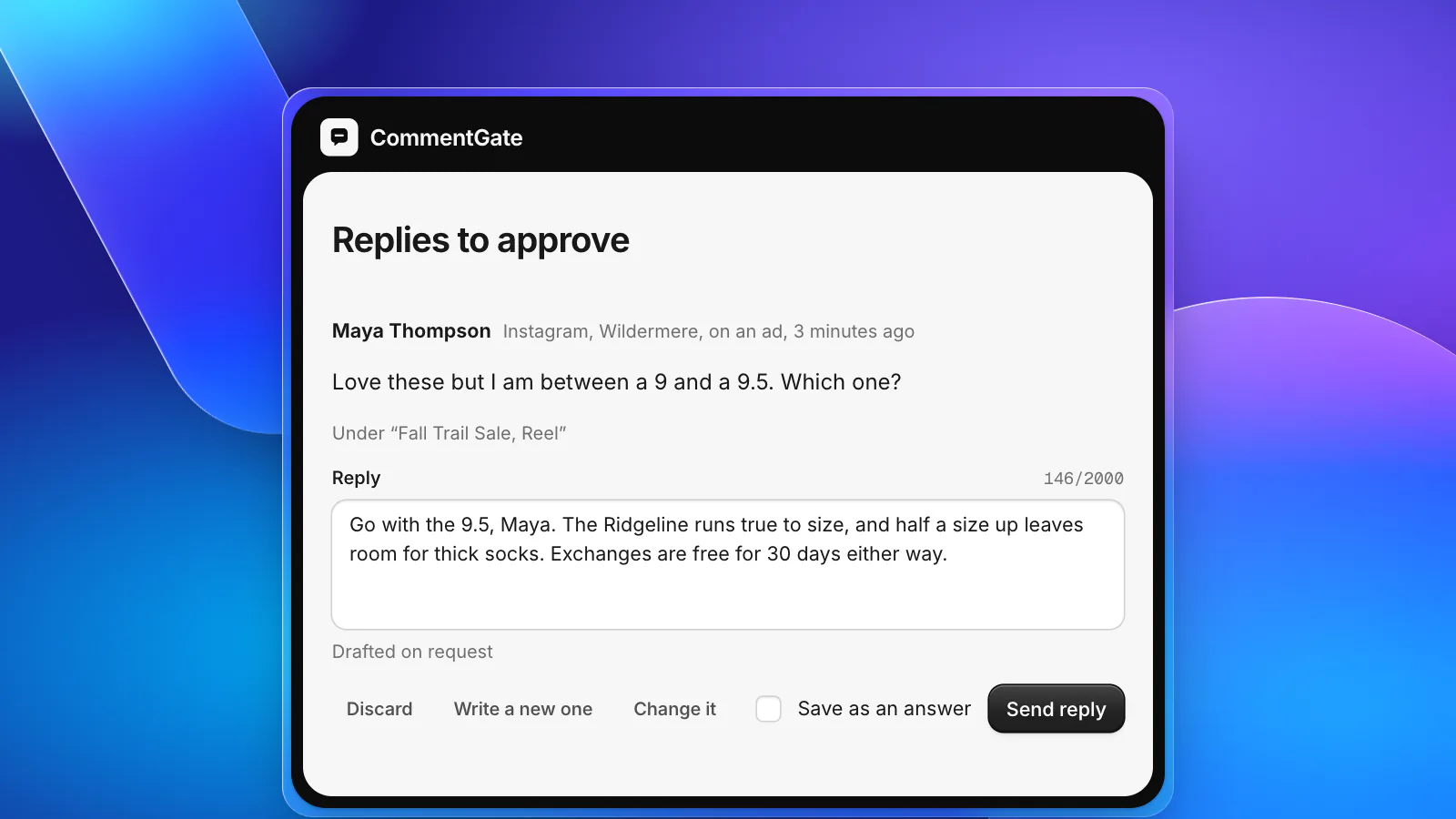
| Draft for me | A reply is written in your voice and waits for your approval. |
| Send on its own | Clear answers go out by themselves; anything uncertain waits for you. |
Finally, one optional line of guidance, in your own words. "We ship from Colorado. Never promise delivery dates. Our return window is 30 days." That line shapes both what gets hidden and how replies sound. You can make one account stricter than another later, but most brands never need to.
Step 3: Done
That is the setup. From here it runs around the clock.
On Facebook and Instagram, a comment is read and handled within seconds of arriving. TikTok comments are handled within minutes, which is as fast as TikTok reports them. YouTube is checked about every 5 minutes.
Here is what you see afterwards.
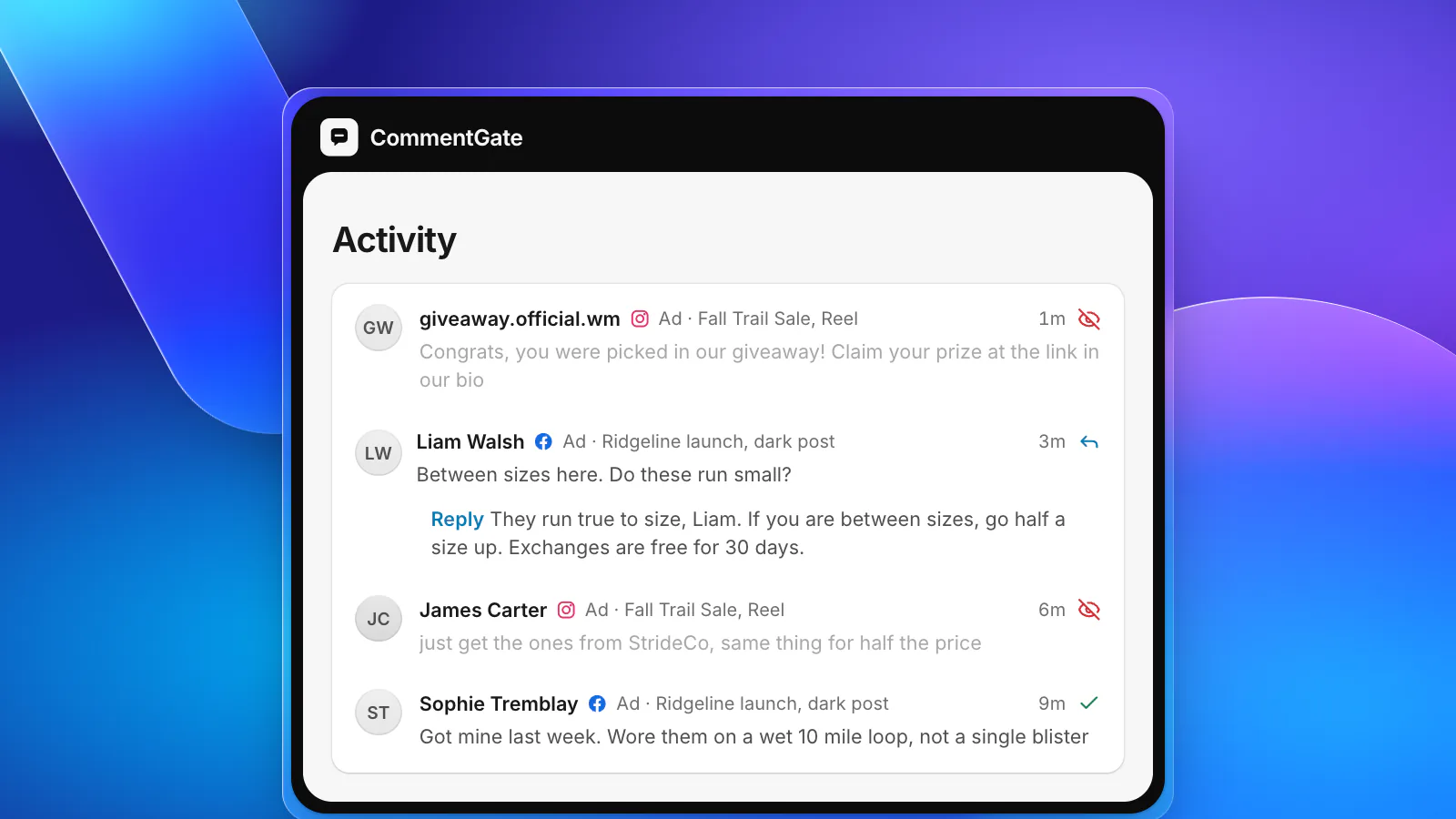
Activity: everything it did, with the reason
Every comment it hid, kept or answered sits in Activity with a one-line reason: which switch it matched and why. Nothing happens out of sight. If it hid something you want up, one click brings it back.
On TikTok, YouTube and Threads, hiding is the only way to remove someone else's comment, so that is what it does. On YouTube, a hidden comment is held for review on your channel, so it can come back later.
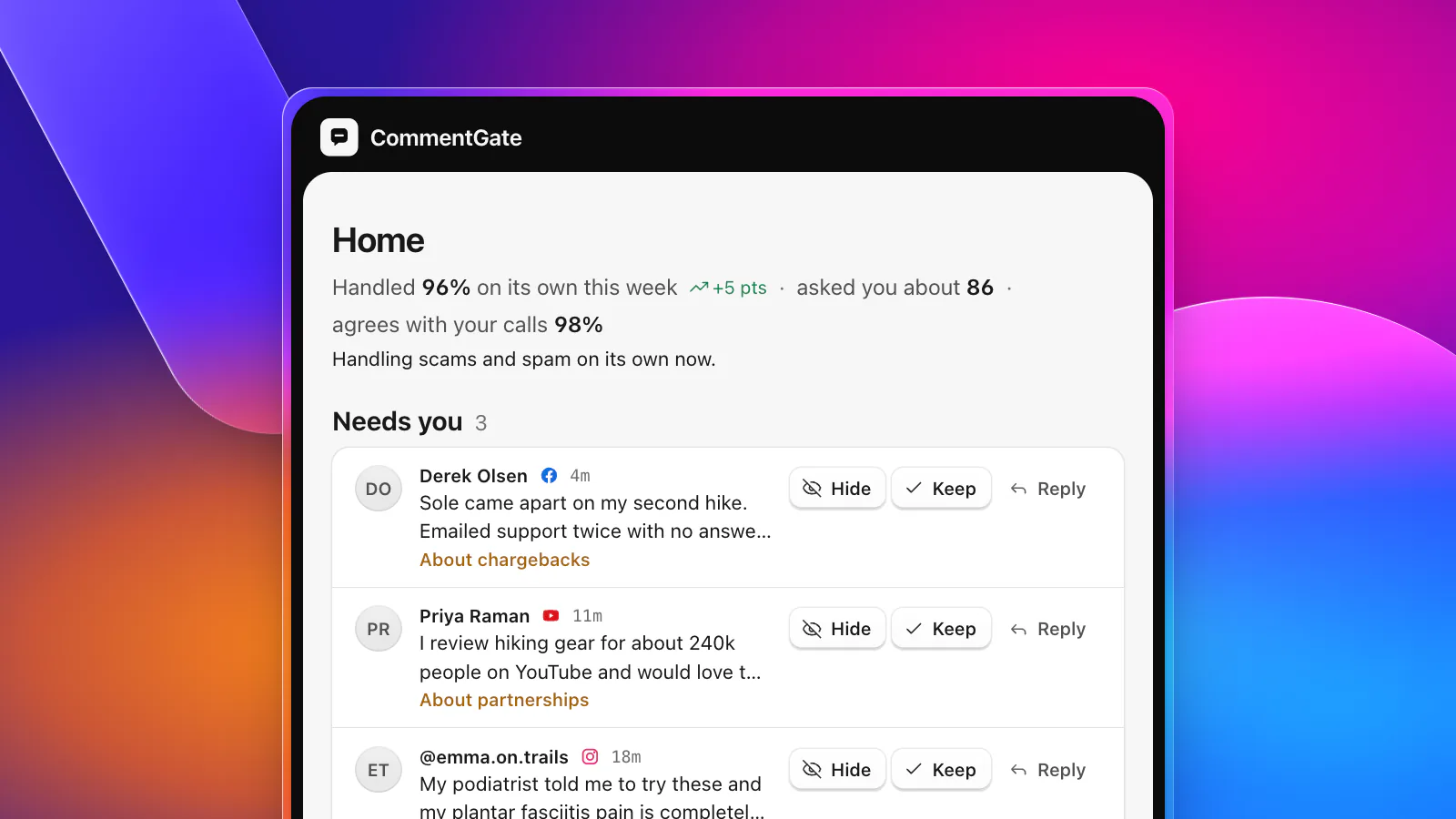
Needs you: only the calls a person should make
A few comments are not about spam or scams at all. They are decisions about your business, and CommentGate brings those to you in Needs you, with a line saying why it is asking:
- A customer threatening a chargeback under your ad. Hiding it could make things worse; answering it well could save the sale. About chargebacks.
- A reviewer with a real audience asking who to talk to about testing your product. About partnerships.
- Glowing praise that makes a medical claim under a paid ad. About health claims. Whether that stays up is your call, not a filter's.
Press asking for comment and safety or defect reports land here too. Obvious spam, scams, self-promotion and competitor plugs never do: those it handles on its own, and you can see them in Activity whenever you want.
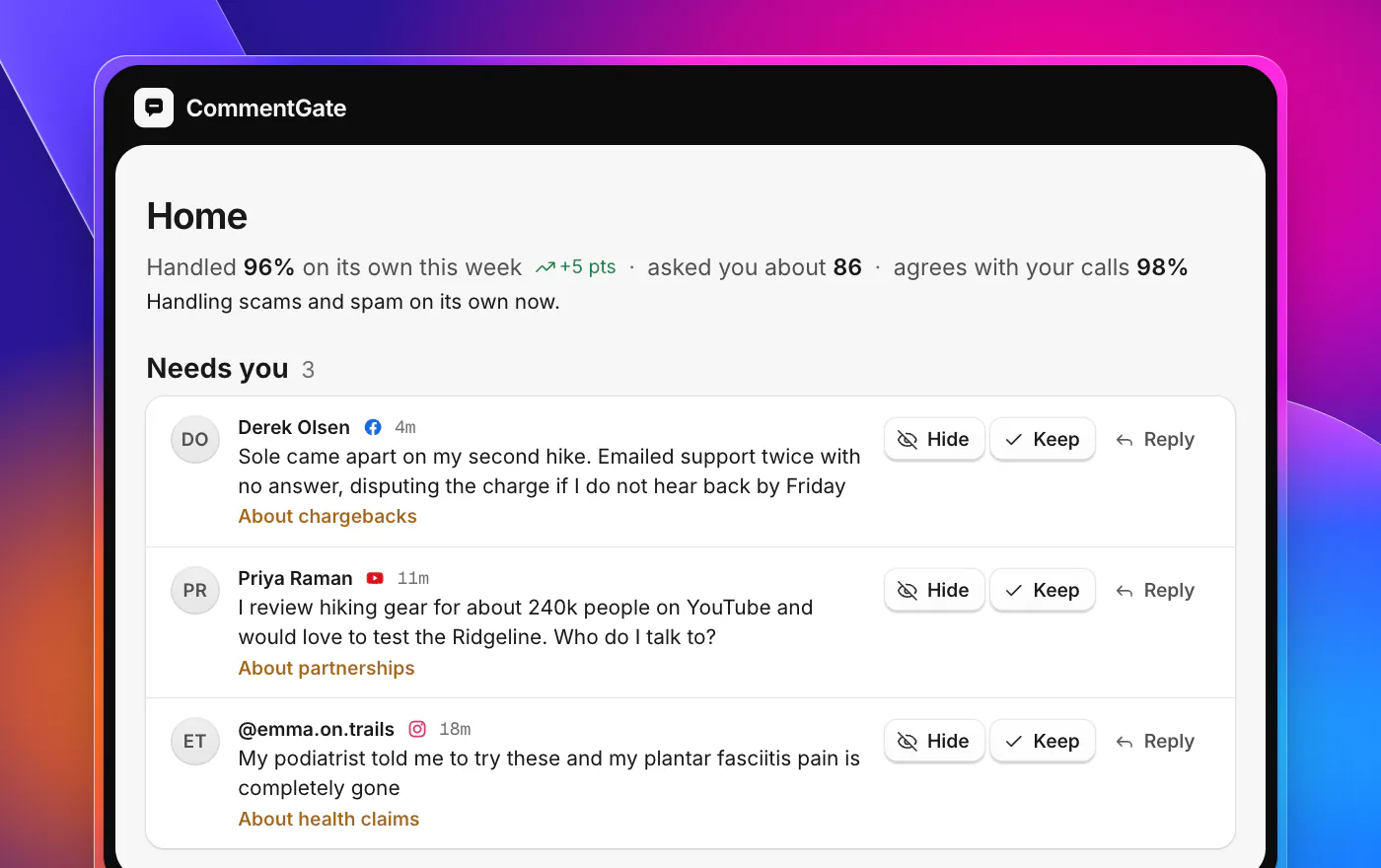
For each one you choose Hide, Keep or Reply, and you are done.
It learns from every correction
Every time you unhide a comment, keep one it asked about, or edit a draft, CommentGate learns from your corrections. It keeps track, area by area, of how often it agrees with your team. Once it agrees 95 times in 100 over the last 100 answers in an area, it handles that area on its own and stops asking. If agreement ever drops under 85%, it starts asking again straight away.
Home tells you this plainly: how much it handled on its own this week, which areas it now handles alone, and how many comments are waiting for you. Most weeks, that last number is small.
What about rules?
If you have been doing this for years and want exact control (a stricter setup on one prospecting ad, a reply to a specific keyword, blocked and allowed words, trusted and muted people), it is all there under Advanced. You do not need any of it to start. The switches cover what most brands need, and everything you correct makes them fit your brand better.
Try it on your own comments
The trial is 7 days with every feature and no card, on as many accounts as you like. Connect one Page or one ad account first, watch a few days of Activity, and decide from there.
Start your free trial, see every feature, or compare plans and pricing.