The comment-to-DM playbook for product launches
Ask people to comment one word, and everyone who does gets your link in a private message. Here is how to plan it, what Meta allows, and the small details that decide whether it works.
Playbooks 6 min read
On this page
A launch post has a job most posts do not: get people from "that looks good" to your product page before they scroll on. The usual way is "link in bio", which asks a curious person to stop, open your profile, find the link, and hope it still points at the right thing. Many of them never get that far.
Comment-to-DM flips it around. You ask people to comment one word, and everyone who does gets a private message with the link, a few seconds later. The comment is effortless, the link lands where they already read messages, and your post collects a stack of comments while it happens.
This playbook covers how to plan one for a launch, what Meta allows, and the details that make the difference between a campaign people enjoy and one that feels like a trap.
What Meta allows
Comment-to-DM runs on a Meta feature called private replies: a business can answer a public comment with one private message. The rules are short, and they shape the whole playbook, so it is worth knowing them exactly.
- One message per comment. Meta allows "only one message" to the person who commented (Messenger private replies, Instagram private replies). Put everything they need in that one message.
- Within 7 days of the comment. After a week, the window closes. On Instagram Live, a private reply can only be sent during the broadcast.
- Follow-ups only if they write back. If the person replies, you can keep the conversation going within 24 hours of their reply. If they do not, the one message is all you get.
- On Instagram, where it lands depends on whether they follow you. It goes to their Inbox if they follow your account, and to their message Requests if they do not.
- The message carries a link to the post they commented on, so they know why you are writing.
It works on Facebook Pages and Instagram professional accounts, on organic posts and on ads. It does not work on TikTok for most brands: TikTok's comparable comment-to-message option is "only available for Business Accounts registered in Vietnam, Indonesia, and Thailand" (TikTok for Business documentation). For a US brand, TikTok launches still point people to the link in your profile.
Step 1: Pick one word
The word is the whole call to action, so it has to be easy to type on a phone and impossible to misread.
- Use the product name or one plain word. RIDGELINE, LINK, EARLY or DROP all work. Avoid words that show up in normal comments ("yes", "love", "want"), or people will get a message they did not ask for.
- One word, not a phrase. Every extra word is another chance for a typo.
- Decide how strict to be. Matching any comment that mentions the word catches "RIDGELINE please!" and "ridgeline 🙌". Matching only the exact word keeps the campaign from firing on "is the ridgeline waterproof?", which deserves a real answer instead.
Step 2: Say it everywhere people will look
People only comment the word if they know it. Say it in three places:
- In the video or the image itself. A line of text on screen near the end ("Comment RIDGELINE for early access") reaches people who never open the caption.
- In the first line of the caption. Captions are cut off after a line or two, so the instruction goes first.
- In your own first comment, if the platform and format allow it, so it sits right where people are about to type.
Say what they get, not just what to do. "Comment RIDGELINE and I will send you early access, 15% off until Sunday" beats "Comment RIDGELINE for the link".
Step 3: Write the one message
Since Meta allows a single message unless they reply, it has to do everything.
- Start with their first name. It reads as a note, not a broadcast.
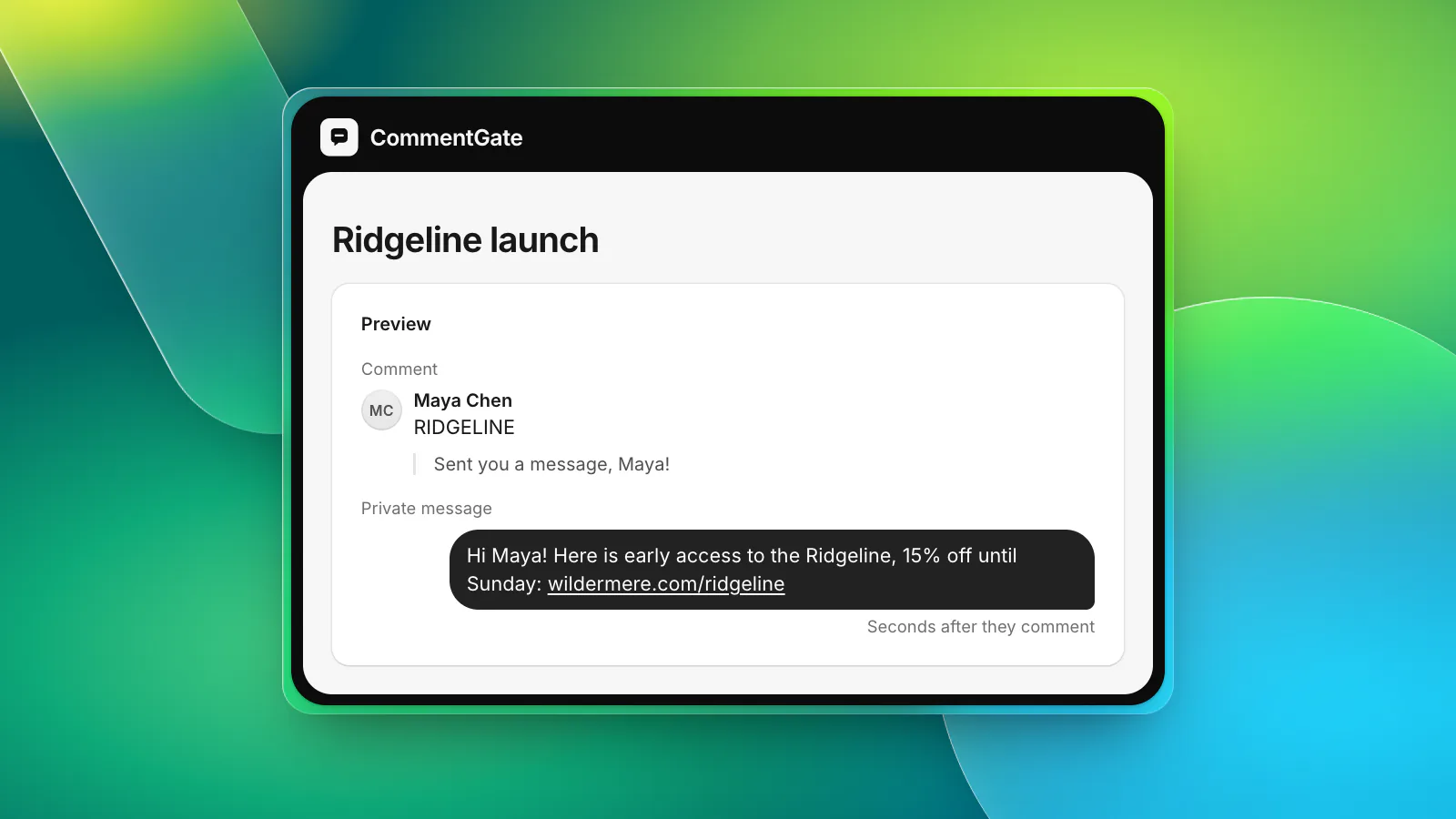
- Say what the link is before you give it. "Here is early access to the Ridgeline, 15% off until Sunday" tells them why to tap.
- Add tracking to the link. A UTM source and campaign on the link lets your store analytics show exactly how many visits and orders came from the campaign.
- Keep it short. Two or three lines. A wall of text in a message request looks like spam.
- Give them a reason to reply, if you want the conversation to continue. "Reply SIZE and I will help you pick one" opens the 24-hour window for a real follow-up.
Step 4: Reply in public too
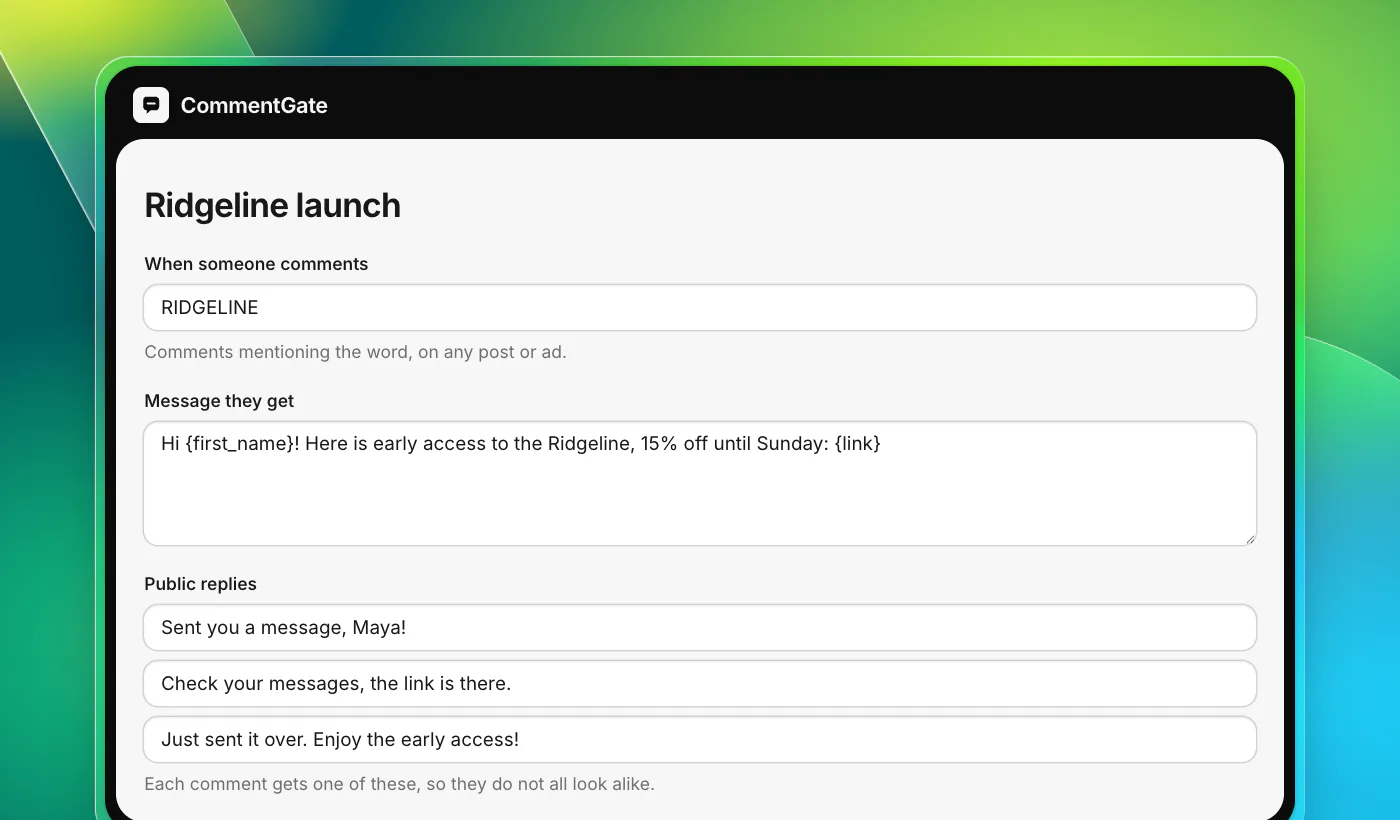
When the message goes out, a short public reply under the comment ("Sent you a message, Maya!") does two jobs. It tells the person to check their messages (especially useful on Instagram, where people who do not follow you get it in Requests), and it shows everyone else reading the comments that the campaign actually works.
Vary the wording. A hundred identical replies stacked under one post look automated, because they are. Write three to five versions and rotate them:
- "Sent you a message, Maya!"
- "Check your messages, the link is there."
- "Just sent it over. Enjoy the early access!"
- "It is in your messages now. Let us know what you think."
Step 5: Run it on posts and ads
A launch usually has both an organic post and ads behind it. Run the campaign on both. Comments on ads count the same way: a person who comments the word under your ad gets the same message.
Two things to decide before the ads go live:
- Scope. Run the campaign on every Facebook and Instagram account, on chosen posts and ads, or on ads only. For a launch, the launch post and its ads are usually the right scope, so an old post that happens to contain the word does not start sending the new link.
- What else happens to the comment. The word comment is not a question and not a complaint, so it should be left up. Your normal moderation keeps running on everything else: a scam that copies your keyword under the ad still gets hidden.
Step 6: Keep the people who asked
Everyone who commented the word raised their hand for this product. That is worth keeping. A lead list with the name, the account they commented from and the campaign they came through lets you follow up later through the channels you already use.
Keep an eye on the numbers that matter while the campaign runs:
- How many people commented the word.
- How many messages went out, and how many could not be sent (for example, the 7-day window passed, or the person does not accept messages).
- How many people tapped the link, from your UTM-tagged analytics.
When to stop
Campaigns are cheerful, and a bad day is not. If something goes wrong around the launch (a stock problem, a shipping delay, a complaint that takes off), the last thing you want is a friendly automatic message going to someone who just commented something angry that happened to contain your word. Pause the campaign first, then deal with the problem.
In CommentGate, crisis mode does this for you: while it is on, campaigns, automatic replies and lead messages stop, and every new comment waits for a person.
Setting it up in CommentGate
In CommentGate, a keyword campaign is a few fields: the word (or any comment), where it runs, the message with the first name and the link, and a few public replies to rotate. Links get your UTM tags added, and everyone who commented is kept as a lead.
It follows Meta's rules for you: one message per comment, only within the window Meta allows, and never twice to the same person for the same campaign. It works on Facebook and Instagram, organic and ads. You can see everything else CommentGate does or what Meta allows on each surface.