Follow to unlock (Instagram)
Send the link only to people who follow you on Instagram, and ask the others to follow first, with the Check they follow step.
Updated
The Follow to unlock template sends your link only to people who follow your Instagram account. Everyone else is asked to follow first, then tap a button to check again. It grows your followers from every post.
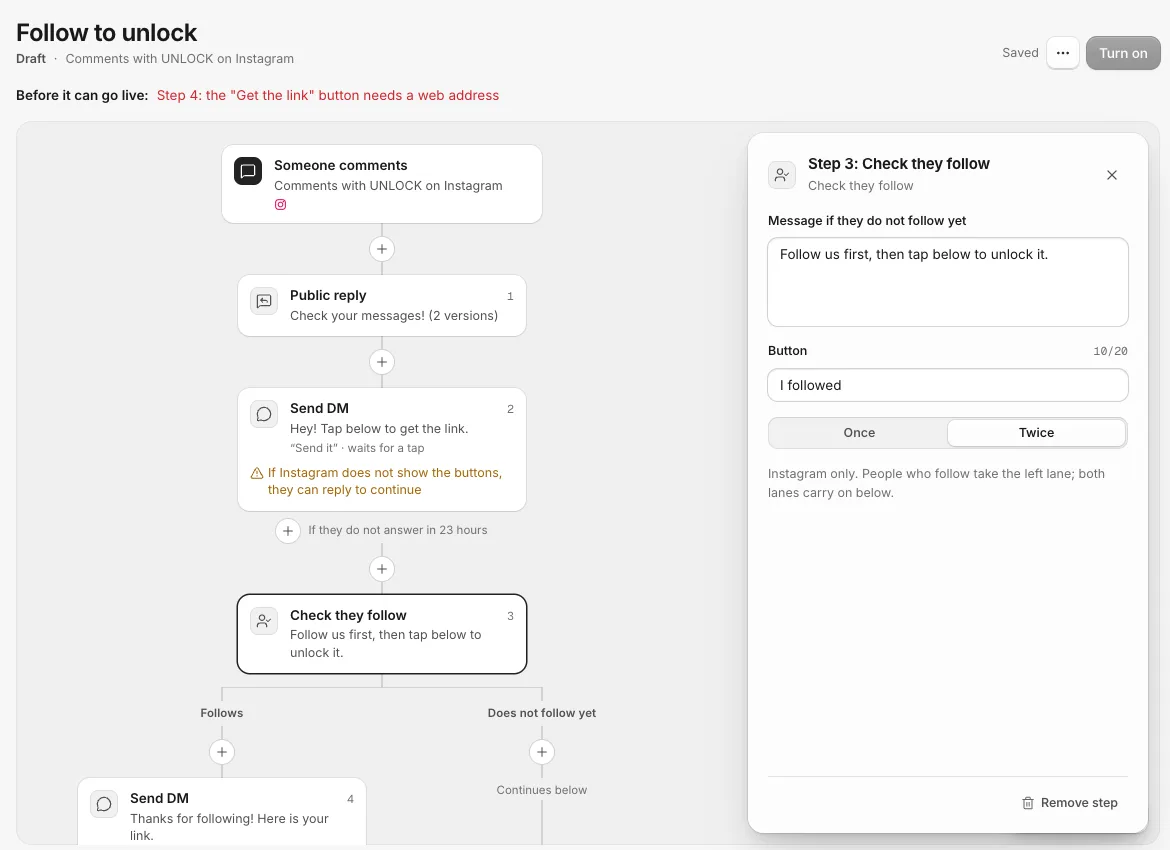
How it runs
- Someone comments UNLOCK on your post.
- They get a public reply ("Check your messages!") and a DM with a Send it button.
- When they tap, the Check they follow step looks them up.
- If they follow you, they take the Follows lane and get the link.
- If not, they get your message, "Follow us first, then tap below to unlock it.", with an I followed button. Tapping it checks again.
Set it up
- Click New campaign and pick Follow to unlock.
- Change the keyword on the trigger if you like.
- Click the Send DM card on the Follows lane and paste your link into the Get the link button.
- Click the Check they follow card to change the Message if they do not follow yet, the Button label (up to 20 characters) and Check again (Once or Twice).
- Click Turn on.
Both lanes carry on with the steps below the check, so anything you add under it runs for everyone.
Why a tap comes first
Instagram only tells a business whether someone follows it after that person has messaged or tapped in the chat. That is why the check always sits after a DM with a button, and why the board offers Check they follow only once the person has tapped or replied.
Where it works
- Instagram: yes.
- Facebook: no. Facebook does not share who follows your Page.
- TikTok: only for people who messaged you (from a DM keyword or a chat link). TikTok shares who follows you only once they message you, so it cannot check people who only commented.
- YouTube, Threads and WhatsApp: no. YouTube does not share who subscribes, Threads does not share who follows you, and WhatsApp has no followers.
You can also use a Branch step with They follow you (Instagram) to split on it without asking them to follow.
Related
- Start a campaign from a template Every new campaign starts from a ready-made board. Here is what each template does and when to pick it.
- The opening DM with a button, and why it matters Facebook and Instagram allow one message to someone who only commented. A button in that first message is what lets the rest of your campaign run.
- Yes and No branches, and Join back Send people down different steps depending on whether they clicked, follow you, replied or have a tag, then bring the lanes back together.
- Every step, and where it works What each campaign step does, and which of Facebook, Instagram, TikTok, YouTube, Threads and WhatsApp allow it, with the reason when one does not.
Still stuck?
Tell us what you were trying to do and what happened. A person replies, usually within one business day.