Every step, and where it works
What each campaign step does, and which of Facebook, Instagram, TikTok, YouTube, Threads and WhatsApp allow it, with the reason when one does not.
Updated
Click any + on the board to see the steps you can add there. Steps that cannot go there stay in the menu under Not available here, each with the reason in plain words.
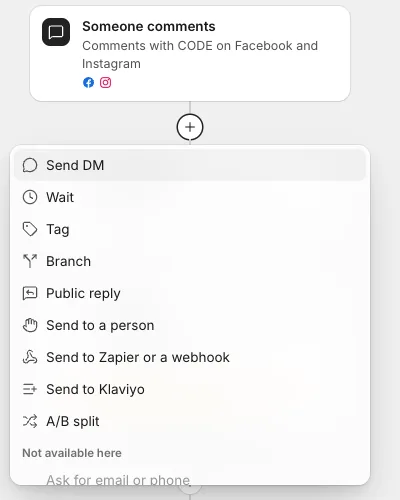
The steps
| Step | What it does |
|---|---|
| Send DM | A private message with up to 3 buttons (a link, or Continue to wait for a tap), up to 13 quick replies, and their first name if you like. Turn on Wait for their tap to hold the next step until they tap |
| Wait | Pauses for minutes, hours or days (up to 7 days), and can hold until a time of day with Then send at |
| Ask for email or phone | Asks a question, checks the answer looks like an email or phone number, asks once more if not, and saves it to the person in People |
| Check they follow | Checks whether they follow your Instagram account. Splits into Follows and Does not follow yet |
| Tag | Adds or removes tags on the person, for example restock or vip |
| Branch | Splits into Yes and No on a question: clicked, replied, has a tag, follows, or platform |
| Public reply | Replies under their comment. Add several versions and one is picked at random, so the replies do not look copied |
| Send to a person | Assigns the conversation in Messages (to anyone, or one teammate) with an optional note, and the campaign stops talking to them |
| Send to Zapier or a webhook | Sends the person's details to a Zapier or webhook address you added under Settings, Alerts |
| Send to Klaviyo | Adds the person to a Klaviyo list with their email or phone and tags. See Send people to Klaviyo |
| A/B split | Sends each person down one of 2 to 4 paths at random. See Test two offers with an A/B split |
| Send a WhatsApp template | An approved WhatsApp message template, the one kind of message WhatsApp allows more than 24 hours after their last message. See WhatsApp campaigns and templates |
Where each step works
"Yes" means the step works there. Where it does not, the reason is the one the board shows.
| Step | TikTok | YouTube | Threads | |||
|---|---|---|---|---|---|---|
| Send DM | Yes | Yes | Yes, but not to people who only commented | YouTube does not allow private messages | Threads does not allow private messages | Yes |
| Wait | Yes | Yes | Yes | Yes | Yes | Yes |
| Ask for email or phone | Yes | Yes | Yes, but not to people who only commented | YouTube does not allow private messages | Threads does not allow private messages | Yes |
| Check they follow | Facebook does not share who follows your Page | Yes | Only once they message you | YouTube does not share who subscribes | Threads does not share who follows you | WhatsApp has no followers |
| Tag | Yes | Yes | Yes | Yes | Yes | Yes |
| Branch | Yes | Yes | Yes | Yes | Yes | Yes |
| Public reply | Yes | Yes | Yes | Yes | Yes | WhatsApp has no comments to reply to |
| Send to a person | Yes | Yes | Yes | Yes | Yes | Yes |
| Send to Zapier or a webhook | Yes | Yes | Yes | Yes | Yes | Yes |
| Send to Klaviyo | Yes | Yes | Yes | Yes | Yes | Yes |
| A/B split | Yes | Yes | Yes | Yes | Yes | Yes |
| Send a WhatsApp template | Only WhatsApp has message templates | Only WhatsApp has message templates | Only WhatsApp has message templates | Only WhatsApp has message templates | Only WhatsApp has message templates | Yes |
Limits that depend on the trigger
Some steps are allowed on a platform but not at every point in a campaign:
- TikTok does not let businesses message people who only commented. On a TikTok comment trigger, Send DM, Ask for email or phone and Check they follow are not available. They work on TikTok when the person messaged you first (a DM keyword or your chat link).
- TikTok shares who follows you only once they message you. So Check they follow works on TikTok for people who started a chat, not for commenters.
- Public reply is only for comment triggers. A campaign that starts from a DM, a story or a link has no comment to reply to.
- Live comments: on Instagram Live, the first DM goes only while you are live, and steps that need an answer are not available ("Only while you are live").
- Messages need a tap or reply first. After the one message Facebook and Instagram allow to someone who commented, the next DM needs them to tap or reply. See The opening DM with a button.
- Text limits: a DM with buttons can be up to 640 characters; without buttons, up to 999 on Instagram and 2,000 on Facebook. A public reply can be up to 150 characters on TikTok and 500 on Threads. Button labels and quick replies are up to 20 characters.
- TikTok DM buttons cannot open links. They can only be tapped to continue.
- WhatsApp shows up to 10 choices in one message, each with a different label.
One campaign, several platforms
A campaign can listen on several platforms at once, for example comments on Facebook and Instagram ads. The + menu then offers a step if at least one of them allows it, and the card says which, for example "Facebook and Instagram only". People on the other platforms skip that step and carry on with the next one, and the card shows the warning "Step 4 is skipped on TikTok". Nothing fails quietly.
Related
- Build a campaign on the flow board Add steps with the + buttons, change them in the side panel, and turn the campaign on once nothing is blocking it.
- The opening DM with a button, and why it matters Facebook and Instagram allow one message to someone who only commented. A button in that first message is what lets the rest of your campaign run.
- Fix what stops a campaign from going live What each line under "Before it can go live" means, and how to fix it so the Turn on button works.
- What can start a campaign The eight triggers, from comments and DM keywords to story replies, Live comments, chat links, ads that open a DM and Send now, and where each one works.
Still stuck?
Tell us what you were trying to do and what happened. A person replies, usually within one business day.