Test two offers with an A/B split
Send people down different paths at random, then read the line on the board that says which path is ahead, if any.
Updated
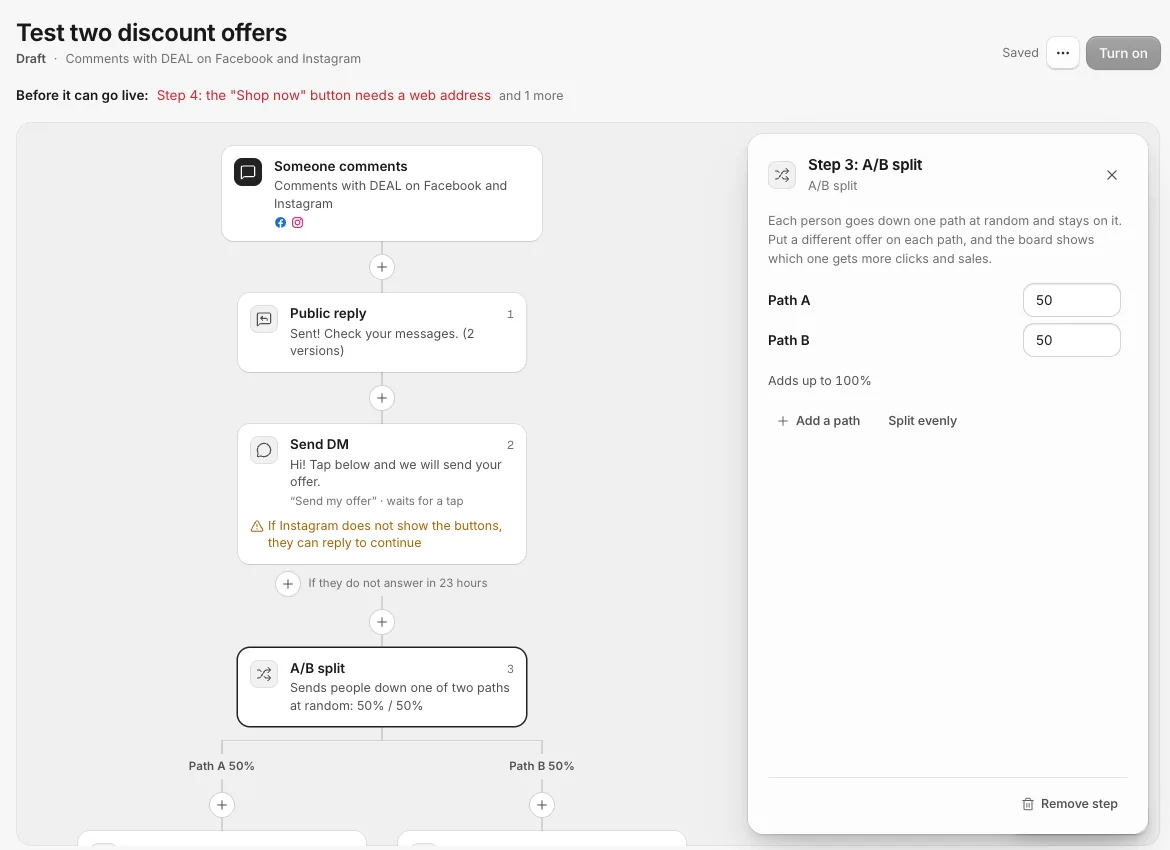
An A/B split sends each person down one of two to four paths at random. Put a different offer on each path, and the board tells you which one brings more clicks or sales. The Test two discount offers template splits people 50/50 between 15% off and free shipping.
Set it up
- Click the + where the split should go and pick A/B split. Or start from Test two discount offers.
- In the side panel, set each path's share in percent. They must add up to 100%; the panel says "Adds up to 100%" when they do.
- Click Add a path for up to four paths, or Split evenly to share them out equally.
- Add steps to each path with the + under Path A, Path B and so on.
Each person is picked for one path at random and stays on it, even if a step is retried. Each path joins back below the split when it ends, so steps you add under the split run for everyone. Turn off Join back on a path to end the campaign there instead.
Read the winner line
With Show numbers on, each path shows its Reached, Clicked and Converted numbers, and the split card has one line that sums them up:
- Not enough people yet: every path needs at least 100 people before they are compared at all.
- No clear winner yet: the paths are close enough that the gap could be chance. Keep it running.
- Path B is ahead: 12% clicked, against 8% on Path A (for example): one path is clearly ahead of every other.
The line compares clicks until the paths have 20 sales between them, then it compares sales, which is what you care about. It counts people, not clicks, so someone who clicks three times counts once. It never names a winner the numbers do not support, so "No clear winner yet" can stay for a while on a small test.
Sales only show once your store reports them. See Tracked links and recording sales.
When you have a winner
You have three ways to act on it:
- Keep testing a little: give the winning path 99% and the other 1%. Every path needs at least 1%.
- Drop a losing path (with three or four paths): click the X next to it in the split's panel. Its steps go with it.
- End the test: remove the A/B split step and add the winning DM in its place. Removing the split also removes the steps on its paths, so copy the winning message first.
On a live campaign, changes go out when you click Publish changes. People already on a path finish it.
Tips
- Change one thing per test: the offer, or the wording, or the button. Otherwise you cannot tell what made the difference.
- Only steps after the split count toward a path. A link sent before the split is the same for everyone, so it is left out.
Related
- Read the numbers on a campaign What Reached, Clicked and Converted mean on each step, what the campaign list totals count, and why some people got no message.
- Yes and No branches, and Join back Send people down different steps depending on whether they clicked, follow you, replied or have a tag, then bring the lanes back together.
- Start a campaign from a template Every new campaign starts from a ready-made board. Here is what each template does and when to pick it.
- Tracked links and recording sales Every link a campaign sends in a DM counts its clicks. Report the sales those clicks lead to, and the revenue shows on the campaign, the step and the lead.
Still stuck?
Tell us what you were trying to do and what happened. A person replies, usually within one business day.