Collect emails and phone numbers in a DM
Use the Ask for email or phone step to get an email or number, check it, save it to the person and send it on to Klaviyo.
Updated
The Ask for email or phone step asks a question in the DM, waits for the answer, checks it looks right and saves it to the person. The Restock alert: collect email and Launch waitlist templates use it.
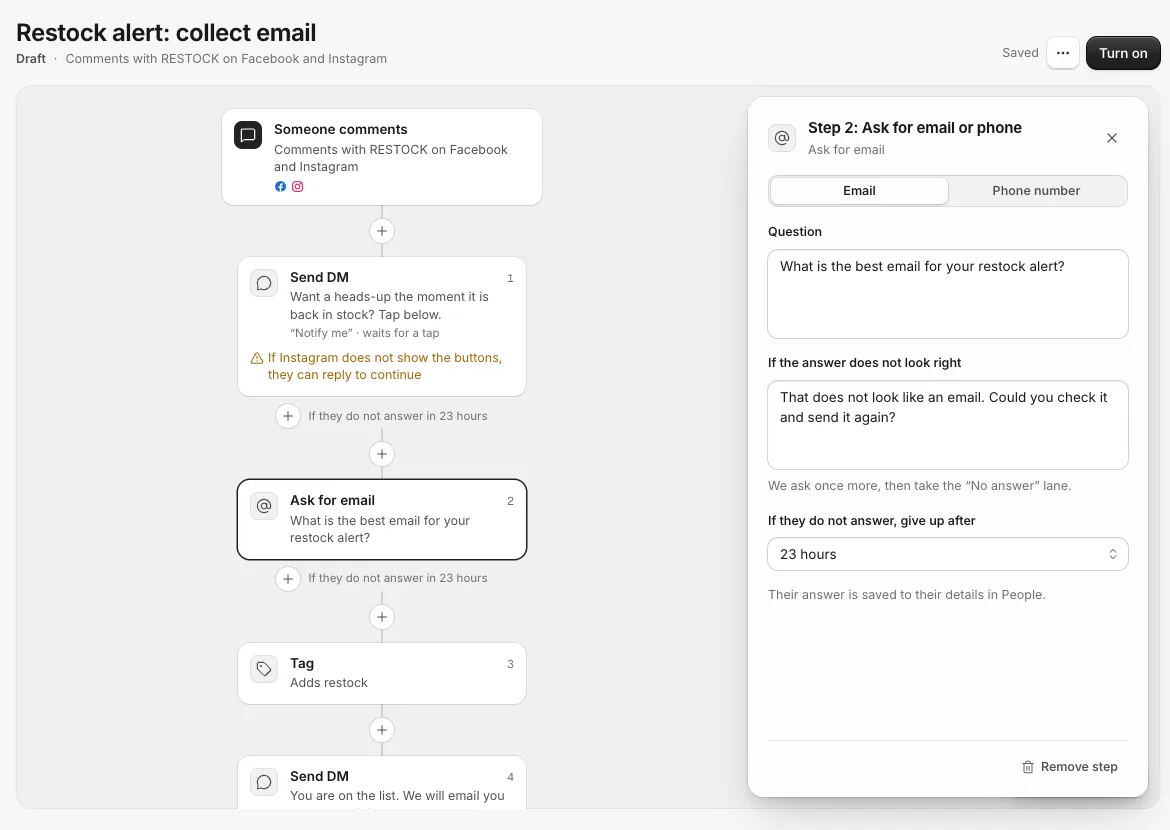
Add the step
- Click the + where the question should go and pick Ask for email or phone.
- Under Ask for, pick Email or Phone number.
- Write the Question, for example "What is the best email for your restock alert?".
- Fill in If the answer does not look right, for example "That does not look like an email. Could you check it and send it again?".
- Under If they do not answer, give up after, pick up to 23 hours.
The step has two lanes: Answered carries on below, and No answer is for people who never give a valid one.
What happens
- They type an answer. If it looks like an email (or a phone number with 7 to 15 digits), it is saved and the campaign carries on.
- If it does not, they get your If the answer does not look right message once. A second wrong answer, or no answer in time, takes the No answer lane.
- On Messenger, people can tap their email or number instead of typing it, and on Instagram their number. The app offers it from their profile.
- On WhatsApp, asking for a phone number is skipped: their number is already known, so it is saved and the campaign carries on.
- Ask for the country code on phone numbers, like +1 for the US or +44 for the UK. The Launch waitlist template does this in its retry message.
The answer is saved to their details in People, where you can see it, filter by it and export it.
It needs a tap or a reply first
Asking a question needs an open conversation. After a comment, put a DM with a button that waits for a tap before this step. After a DM keyword, a story reply or your chat link, you can ask straight away. See The opening DM with a button.
It works on Facebook, Instagram, TikTok (for people who messaged you) and WhatsApp. YouTube and Threads have no private messages.
Where the email or phone goes next
- Klaviyo: add a Send to Klaviyo step after it, or turn on Send each new email or phone in Settings, Integrations. See Send people to Klaviyo.
- Meta Events Manager: an email or phone given in a Messenger or Instagram DM can be sent to your Meta dataset as a lead. See Send sales and leads to Meta.
- Zapier, Make or your own tools: the "Contact Updated" trigger fires when someone gives an email or phone. See Zapier and Make.
Related
- The opening DM with a button, and why it matters Facebook and Instagram allow one message to someone who only commented. A button in that first message is what lets the rest of your campaign run.
- Send people to Klaviyo Emails and phone numbers people give you in DMs go to a Klaviyo list with their tags. By default they are only added to the list, not subscribed to marketing.
- Send sales and leads to Meta Connect your Meta dataset so sales from your tracked links and emails people give you in DMs reach Events Manager, and your ads learn who buys.
- Start a campaign from a template Every new campaign starts from a ready-made board. Here is what each template does and when to pick it.
Still stuck?
Tell us what you were trying to do and what happened. A person replies, usually within one business day.