Send sales and leads to Meta
Connect your Meta dataset so sales from your tracked links and emails people give you in DMs reach Events Manager, and your ads learn who buys.
Updated
Your ads get better at finding buyers when Meta knows who bought. Connect your Meta dataset (the one your pixel uses) and CommentGate sends it two kinds of events:
- Sales: each sale reported on a tracked link is sent as a Purchase.
- Leads: an email or phone someone gives in a Messenger or Instagram DM is sent as LeadSubmitted.
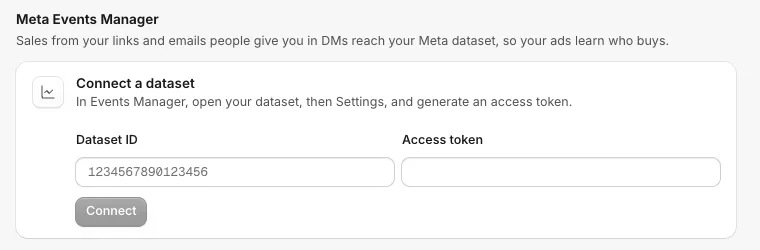
Connect
- In Meta Events Manager, open your dataset, then Settings, and generate an access token.
- In CommentGate, open Settings, then Integrations, and find Meta Events Manager.
- Paste the Dataset ID and the Access token, and click Connect.
- Choose what to send with the Sales and Leads switches.
Check it works
Under Check it works, paste the test code from Events Manager, Test Events, and click Send a test. A $0 test sale shows only in Test Events, never in your real results.
What to know
- Sales are sent only once they are recorded. A sale reaches Meta when your store (or Zapier, Make or your developer) reports it on a tracked link. See Tracked links and recording sales.
- Meta needs the buyer's browser details for a website sale. A sale reported without them is recorded in CommentGate but not sent to Meta, and the reason shows in Settings. In Zapier and Make, fill in Buyer browser (user agent) on the Record a Sale action, and Buyer IP address, Meta browser ID (_fbp) and Meta click ID (_fbc) when your store keeps them, since they help Meta match the sale. Without the buyer browser, those sales stay in CommentGate only. Sales your developer reports with the same details (see the developer docs) are sent too.
- Meta only accepts events up to 7 days old, so report sales promptly.
- Leads come from Messenger and Instagram DMs only, not TikTok or WhatsApp.
- If your store also sends Purchases through the Meta pixel, report the same order id so Meta counts the sale once.
Pause or disconnect
Turn off Send to Meta to pause: nothing is sent until you turn it back on. Disconnect stops sending; events already sent stay in your dataset. If an event is refused, the reason shows under Send to Meta, "The last event did not go through", followed by what Meta said.
Related
- Tracked links and recording sales Every link a campaign sends in a DM counts its clicks. Report the sales those clicks lead to, and the revenue shows on the campaign, the step and the lead.
- Send people to Klaviyo Emails and phone numbers people give you in DMs go to a Klaviyo list with their tags. By default they are only added to the list, not subscribed to marketing.
- Collect emails and phone numbers in a DM Use the Ask for email or phone step to get an email or number, check it, save it to the person and send it on to Klaviyo.
- Get alerts in Slack, Discord or email Choose where CommentGate tells you about comments that need you, a sudden rush of harmful comments, new leads and more, and exactly which events each place hears about.
Still stuck?
Tell us what you were trying to do and what happened. A person replies, usually within one business day.