Get alerts in Slack, Discord or email
Choose where CommentGate tells you about comments that need you, a sudden rush of harmful comments, new leads and more, and exactly which events each place hears about.
Updated
Alerts live in Settings, Alerts. Each place an alert goes is a channel: an email list, a Slack channel, a Discord channel or a webhook. Every channel has its own list of events, so the moderation channel in Slack can hear about comments to review while the owners only get the daily digest.
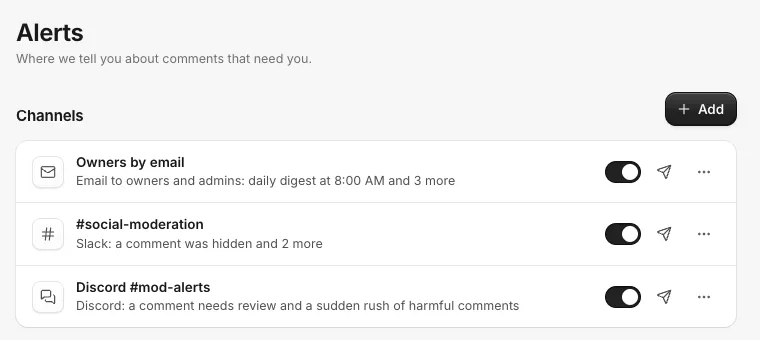
Add a channel
- Open Settings, then Alerts.
- Click Add and pick Email, Slack, Discord or Webhook.
- Give it a Name, for example #social-moderation.
- Fill in where it goes (below), tick the events under Tell me when, and click Add channel.
- Click the paper plane button next to the channel to Send a test, and check it arrived.
Owners, admins and managers can change alerts.
Under Send to, pick Owners and admins, or These addresses and type up to 25 addresses, pressing Enter after each.
Slack
In Slack, add the Incoming Webhooks app to your workspace, choose the channel, and copy the webhook address it gives you (it starts with https://hooks.slack.com/). Paste it into Slack incoming webhook.
Discord
In Discord, open the channel's settings, then Integrations, Webhooks, and Copy Webhook URL. Paste it into Discord channel webhook. Nothing in a comment can ping your server.
The events
- A comment was hidden
- A comment needs review
- A comment needs a reply
- A rule set to notify you matched
- A sudden rush of harmful comments
- An account needs reconnecting
- Daily digest (pick the hour under Send the daily digest at; it covers the day before)
- A new direct message arrived
- Every new comment
- A buyer lead came in
- A person's email, phone or tags changed (for example someone gave their email in a campaign)
- An ad draws unusually many harmful or negative comments
- Weekly summary (Mondays)
New Slack and Discord channels start with A comment needs review, A sudden rush of harmful comments and An account needs reconnecting ticked. New email channels start with the daily digest, reconnecting and rushes. Owners and admins get an email when an account needs reconnecting even without any alert set up, at most once a day for each account.
The Monday email
Below the channels, Monday email sends each person on the team what your comments told you last week, every Monday at 8:00 AM in your brand's time zone. Owners get it unless they turn it off; anyone else can turn it on. Click Preview to see the latest one.
Pause, change or remove a channel
Use the switch next to a channel to pause it. The ... menu edits or deletes it. Deleting stops alerts going there, and rules that used it skip it.
Webhooks
A Webhook channel sends each event to your own address, signed so you can check it came from CommentGate. It is also where you add a Zapier or Make address for the campaign step Send to Zapier or a webhook. See Zapier and Make, and the developer docs for the details.
Related
- Connect Zapier and Make Start a Zap or a Make scenario when a comment arrives, is hidden, needs you or turns into a lead, and hide, reply or record a sale from any other app.
- Send people to Klaviyo Emails and phone numbers people give you in DMs go to a Klaviyo list with their tags. By default they are only added to the list, not subscribed to marketing.
- Use CommentGate from Claude, ChatGPT or a terminal Connect an AI assistant to work through what is waiting for you, hide and reply, and pull your numbers in a chat, or use the command line tool.
- Add your product catalog Pick the Meta catalogs your ads already use, upload a product feed, or give a feed URL, so replies can quote real prices, stock and sizes.
Still stuck?
Tell us what you were trying to do and what happened. A person replies, usually within one business day.