Move over from ManyChat
Bring your ManyChat tags, custom fields and contacts over, and rebuild your automations as campaigns. ManyChat does not let anyone copy its automations out.
Updated
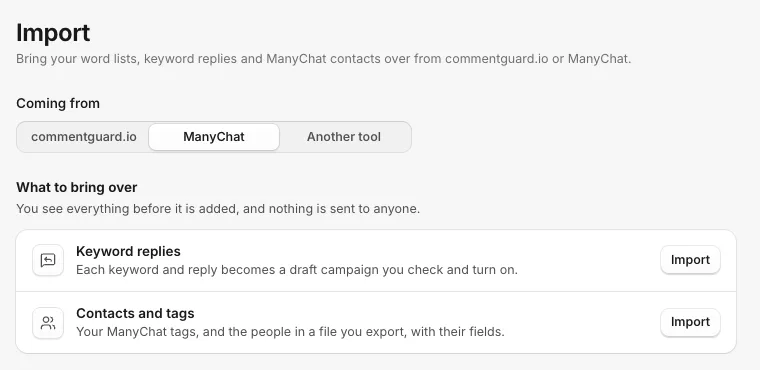
Open Settings, then Import, and under Coming from pick ManyChat. You can bring two things over: your contacts and tags, and your keyword replies.
What ManyChat does not let you bring
- Your automations (flows). ManyChat shares only their names, not what is inside them. The import lists them so you know what to rebuild, and the quickest way is a campaign template. See Start a campaign from a template.
- Everyone at once. ManyChat has no way to download all your contacts, so you bring a file of the people you want (below).
Contacts and tags
You need ManyChat's Pro plan for this, because it uses a ManyChat key.
First, make a file of the people you want, one of two ways:
- Messenger or Instagram ids: in ManyChat Contacts, choose Bulk actions, then Export PSID (Messenger) or Export IG Custom Audience (Instagram).
- Names, emails, tags and fields: send your contacts to a Google Sheet with ManyChat's Google Sheets action, including Contact Id, then download it as a CSV. CommentGate fills in the rest from ManyChat.
Then import it:
- Next to Contacts and tags, click Import.
- In ManyChat, open Settings, then API, and generate or copy your key.
- Paste it into ManyChat API key and click Connect. CommentGate shows how many tags and custom fields it found. The key is used for this import only and is not kept.
- Under Your people, upload the file.
- Pick what These ids are, and the Account they message (a Facebook Page for Messenger ids, an Instagram account for Instagram ids).
- Click Preview, check the numbers, and click Import.
Keep the page open until it finishes. If it stops, run the same file again: people already in are updated, never added twice. Tags you already have are kept as they are.
Can I message imported contacts?
Not straight away. Facebook and Instagram let a business message someone only within 24 hours of their last message, whichever tool you use. Imported people show in People with their tags, emails, phones and fields, and when one of them messages you again, you can reach them as usual, including with Send now.
Keyword replies
- Next to Keyword replies, click Import.
- Pick how they answer: Reply under the comment, Message the commenter or Answer a direct message.
- Type each keyword and its reply: the keywords, then -> and the reply, one per line. Or upload a CSV from the template.
- Click Preview, then Create. Each becomes a draft campaign on Campaigns to check and turn on.
Related
- Move over from commentguard.io Bring your hide words, whitelist, competitor names and auto-replies from commentguard.io by pasting them in. You check everything before it is added.
- Start a campaign from a template Every new campaign starts from a ready-made board. Here is what each template does and when to pick it.
- Answer a word in a direct message Start a campaign when someone messages you a word like PRICE or RESTOCK on Facebook, Instagram, TikTok or WhatsApp.
- Send a message now to people you have talked to A campaign that starts with Send now messages the people you pick by tag. It reaches only people the platform lets you message, and the confirmation tells you who before anything is sent.
Still stuck?
Tell us what you were trying to do and what happened. A person replies, usually within one business day.