A comment wasn't hidden
Why a comment you expected to be hidden is still up, how to find the reason in Activity, and what to change so it does not happen again.
Updated
First, find the comment and read why. Open Activity, search for a few words of it, and open it. The line at the top says what happened and who decided: autopilot, a rule, your lists or a teammate. Press Why for more.
Then match what you see to one of the cases below.
It says Needs review
CommentGate was not sure, or the comment is about a topic under Always ask me about on Setup (chargebacks, legal threats, press, safety, health claims, partnerships). It waits for you instead of acting. Press Hide and it learns from that.
It says Allowed
CommentGate read it and kept it. The usual reasons:
- The switch is off. Only the kinds of comment you switched on at Setup are hidden. Profanity, links, phone numbers and emails, images and GIFs, and negative comments are all off until you turn them on.
- A list kept it. A word on your Allowed keywords list, or an author on Trusted authors, keeps a comment up whatever else it says. Check Setup, Advanced, Lists.
- A link to your own site. Links to sites on Allowed domains do not count as links.
- The account watches posts only, or ads only. The reason says "Not moderated: this account is set to watch ads only" (or posts only). Change it on Accounts with Customize for one account.
If CommentGate simply got it wrong, press Hide, it was not fine. That hides it and teaches CommentGate at the same time.
It shows under Needs attention on Home
The platform refused the hide. Each row says what the platform said and the one thing that helps.
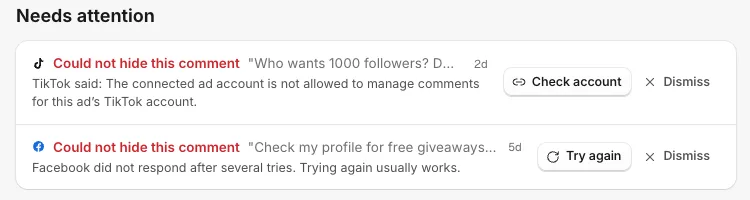
- Try again: the platform did not respond. Trying again usually works.
- Reconnect: the account needs signing in again. See Reconnect needed.
- Check account: the account is not allowed to do that there. For example, a TikTok ad account that does not manage the TikTok account the ad runs from.
- Dismiss: the comment is no longer on the platform, or you want to leave it.
It came in before you connected
Comments from the 30 days before you connected are never hidden on their own. Ones that look harmful wait in Needs review with a suggestion. Press Hide to act on them.
Nothing is being hidden at all
- No plan. When the free trial ends, or a plan is canceled or unpaid, comments are still saved but nothing is hidden or answered until a plan is chosen. See Free trial.
- Crisis mode. While crisis mode is on, every new comment is held in Needs review instead of acted on. Turn it off in Campaigns, Crisis mode.
- The account is off. On Accounts, the switch next to the account must be on.
Things no one can hide
- Comments on Instagram live videos can be read but not hidden.
- On Threads, only replies made directly to your post can be hidden (hiding one hides the replies under it too).
- On YouTube, CommentGate checks for new comments about every 5 minutes, so a hide can take a few minutes.
More on each platform in What each platform allows.
Related
- A comment was hidden that shouldn't have been Unhide it from Activity in one click. That also teaches CommentGate, so similar comments stay up next time.
- "Reconnect needed": what it means and how to fix it A platform asked you to sign in again. Until you reconnect, comments on that account are not read or acted on. It takes a minute.
- Comments aren't arriving How quickly comments should show up on each platform, and what to check when a post or ad has comments that are missing from Activity.
- What each platform allows: hide, delete, reply and like Each platform decides what outside apps may do with comments. Here is what CommentGate can do on each one, and why.
Still stuck?
Tell us what you were trying to do and what happened. A person replies, usually within one business day.