Your first 15 minutes
Connect your accounts, check the switches on Setup, and clear Needs you once, so CommentGate knows how you like things done.
Updated
Three things, in this order. Most brands are done in a quarter of an hour.
1. Connect your accounts (5 minutes)
When you first sign in, CommentGate walks you through it. You can also go to Accounts at any time.
- Under Connect your accounts, pick a platform, for example Connect Facebook and Instagram.
- Sign in on the platform's page and allow everything it asks for. Leaving a permission off means some comments cannot be read or hidden.
- Back in CommentGate, tick the accounts you want watched and press Watch.
Comments from the last 30 days come in right after you connect. From then on, new comments arrive as they are posted.
Step by step for each platform: Facebook and Instagram, ad accounts, TikTok, YouTube and Threads.
2. Check the switches (3 minutes)
Open Setup. Hide scams and fake giveaways, spam, hate and harassment, and competitor mentions are on from the start. Everything else is off until you turn it on.
- Turn on Hide profanity, Hide links, Hide phone numbers and emails or Hide images and GIFs if your brand wants them gone.
- Leave Hide negative comments off unless you are sure. Most brands answer criticism in public instead.
- Choose how Answer questions works: Off, Draft for me or Send on its own. Start with Draft for me until you like what it writes.
- Under Always ask me about, keep the topics you want to see yourself, like chargebacks and legal threats.
- Write one line under Anything we should know about your brand?, for example: "We sell trail shoes. Sizing questions are welcome. Never hide complaints about delivery."
Changes save as you make them. Only owners and admins can change Setup.
3. Clear Needs you once (5 minutes)
Go to Home. Needs you lists the comments CommentGate was not sure about.
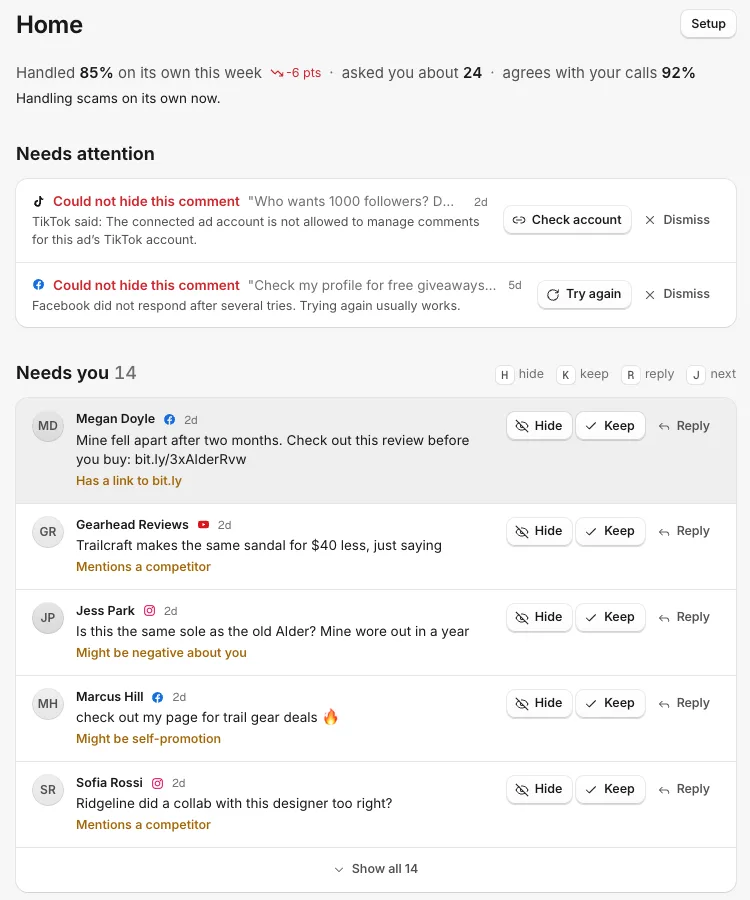
For each one, press Hide, Keep or Reply. On a keyboard, H hides, K keeps, R replies and J moves to the next one. Every answer teaches CommentGate how you like things done, so the list gets shorter.
If Needs attention appears above it, a platform refused an action. Follow the button on each row (Try again, Reconnect or Check account). See A comment wasn't hidden.
After that
- Add an alert so you hear about what needs you: Settings, Alerts, Add a channel.
- Invite your team from Settings, Members. See Invite your team.
- Check Home once a day for a week. You will see the share it "Handled on its own this week" climb.
Related
- What CommentGate does, in 2 minutes CommentGate reads every comment on your posts and ads, hides the harmful ones, drafts answers and asks you only about the hard calls.
- How the autopilot learns, and when it acts alone Every hide, keep, unhide and reply edit is a lesson. When CommentGate agrees with you often enough in an area, it stops asking about it.
- Connect Facebook Pages and Instagram Sign in with Facebook once to bring in your Pages, their Instagram accounts and your ad accounts.
- Switching from another tool Bring your hide words, keyword replies and ManyChat contacts over from commentguard.io, ManyChat or any other tool, and check everything before it is added.
Still stuck?
Tell us what you were trying to do and what happened. A person replies, usually within one business day.